Unfortunately at this time, I do not have any updates for you regarding the resolution of the issue. Can you please clarify if the Newest Beta Drivers for your particular card experience this issue as well?
The fact that this issue is still ongoing is ridiculous, I bought this game at release, and still months later, no fix, not even a word on progress. How do know if anyone is even working to fix this.
Still have problem with game of throne all animation has constant think black lines running over all the characters and make not worth it to play the game
I have VisionTek R9 285 and I am having problem with black shadowy edges/blobs covering up character models among other things. The game is unplayable. I have sat here over a hour trying different combinations, I have even tried 2 different drivers. Nothing is fixing this problem, I have played though 3 episodes like this and can't bear another. Sadly, I will have to give this game a bad review because its unplayable for me. I basically spent $30 on something I will get no use from until its fixed. That said, being its half year after issue was reported and its not fixed I see it not getting fixed, hence bad review.
I am having this same exact issue. I just bought the game from Steam and I've tried a whole bunch of graphics changes. Nothing helps. My graphics card is the AMD R9 200 series and my drivers are currently updated using 14.501 and 14.12 Catalyst Omega Software.
Unfortunately we are still looking into the root cause of the issue, and I do not have any updates on a resolution for this particular issue. If you would like to play sooner than later, my previous suggestion of installing a previous driver version should temporarily resolve this particular issue if you are using an AMD R9 series GPU.
Put the dll's in the folder of the exe (example for Steam C:\Program Files (x86)\Steam\steamapps\common\Game of Thrones), these dll's are taken directly from AMD official drivers and force the game to run with an old driver (in this case version 14.9).
I think I found a trick to solve the problem...
Download this zip: https://www.sendspace.com/file/bdut48
Put the dll's in the folder o… moref the exe (example for Steam C:\Program Files (x86)\Steam\steamapps\common\Game of Thrones), these dll's are taken directly from AMD official drivers and force the game to run with an old driver (in this case version 14.9).
To me the problem has solved, let me know.
I think I found a trick to solve the problem...
Download this zip: https://www.sendspace.com/file/bdut48
Put the dll's in the folder o… moref the exe (example for Steam C:\Program Files (x86)\Steam\steamapps\common\Game of Thrones), these dll's are taken directly from AMD official drivers and force the game to run with an old driver (in this case version 14.9).
To me the problem has solved, let me know.
Thank you I just purchased this on steam during the 50% off sale and I have R9 285 and was in horror when I seen this has been an issue for 8-9months or so. Glad to have found a fix, thanks very much for your efforts... kind of wish I could give you some money that I gave to telltale, as you've done a better job at solving this than they have!
I think I found a trick to solve the problem...
Download this zip: https://www.sendspace.com/file/bdut48
Put the dll's in the folder o… moref the exe (example for Steam C:\Program Files (x86)\Steam\steamapps\common\Game of Thrones), these dll's are taken directly from AMD official drivers and force the game to run with an old driver (in this case version 14.9).
To me the problem has solved, let me know.
I think I found a trick to solve the problem...
Download this zip: https://www.sendspace.com/file/bdut48
Put the dll's in the folder o… moref the exe (example for Steam C:\Program Files (x86)\Steam\steamapps\common\Game of Thrones), these dll's are taken directly from AMD official drivers and force the game to run with an old driver (in this case version 14.9).
To me the problem has solved, let me know.
So this worked for me when i was using windows 8.1, then i upgraded into windows 10. Now if I use the dll's, it just boots to a white screen. Do u have any ideas? thx
I think I found a trick to solve the problem...
Download this zip: https://www.sendspace.com/file/bdut48
Put the dll's in the folder o… moref the exe (example for Steam C:\Program Files (x86)\Steam\steamapps\common\Game of Thrones), these dll's are taken directly from AMD official drivers and force the game to run with an old driver (in this case version 14.9).
To me the problem has solved, let me know.
The above fix does in fact work, but the fact that TellTale has known about this issue for 8 months and still doesn't even seem to know what's causing it shows just how little effort they put into fixing their games.
So this worked for me when i was using windows 8.1, then i upgraded into windows 10. Now if I use the dll's, it just boots to a white screen. Do u have any ideas? thx
Same.. that guys fixed worked for me on windows 8.1, but white screen on windows 10. Game will boot if i remove the dlls but surprise surprise the original issue comes back.
Telltale not even responding anymore. Might just do a steam refund explaining this, beyond a joke.
So this worked for me when i was using windows 8.1, then i upgraded into windows 10. Now if I use the dll's, it just boots to a white screen. Do u have any ideas? thx
I think I found a trick to solve the problem...
Download this zip: https://www.sendspace.com/file/bdut48
Put the dll's in the folder o… moref the exe (example for Steam C:\Program Files (x86)\Steam\steamapps\common\Game of Thrones), these dll's are taken directly from AMD official drivers and force the game to run with an old driver (in this case version 14.9).
To me the problem has solved, let me know.
I used the same method that I've used to fix frame rate in The Witcher 3, by moving old dll's driver in exe folder. Now I have no idea, Telltale have to fix that problem definitively... problem start with AMD Omega drivers (14.12) released 09/12/14.



Comments
Yes they do, I had installed them hoping it would be the fix, but It almost looks like the lines might of got thicker.
Thank you for the extra information, I will make sure to pass it along to the team.
Same problem here... and the new beta driver for GTA V doesnt change anything.
I really regret buying this crap... :-(
I also have this issue, and i'm pretty disappointed. Gonna ask from Steam if i could get my money back.
Would be nice if you let Steam also know about these issues, so getting money back would also be way easier.
The fact that this issue is still ongoing is ridiculous, I bought this game at release, and still months later, no fix, not even a word on progress. How do know if anyone is even working to fix this.
Thread: Thick black lines`
Still have problem with game of throne all animation has constant think black lines running over all the characters and make not worth it to play the game
I have VisionTek R9 285 and I am having problem with black shadowy edges/blobs covering up character models among other things. The game is unplayable. I have sat here over a hour trying different combinations, I have even tried 2 different drivers. Nothing is fixing this problem, I have played though 3 episodes like this and can't bear another. Sadly, I will have to give this game a bad review because its unplayable for me. I basically spent $30 on something I will get no use from until its fixed. That said, being its half year after issue was reported and its not fixed I see it not getting fixed, hence bad review.
Can we just get an honest answer? Is this going to be fixed or not? At least that way I can just stop hoping for an update.
I too have the same issue. Recently installed Ori and The Blind Forest, look at it.
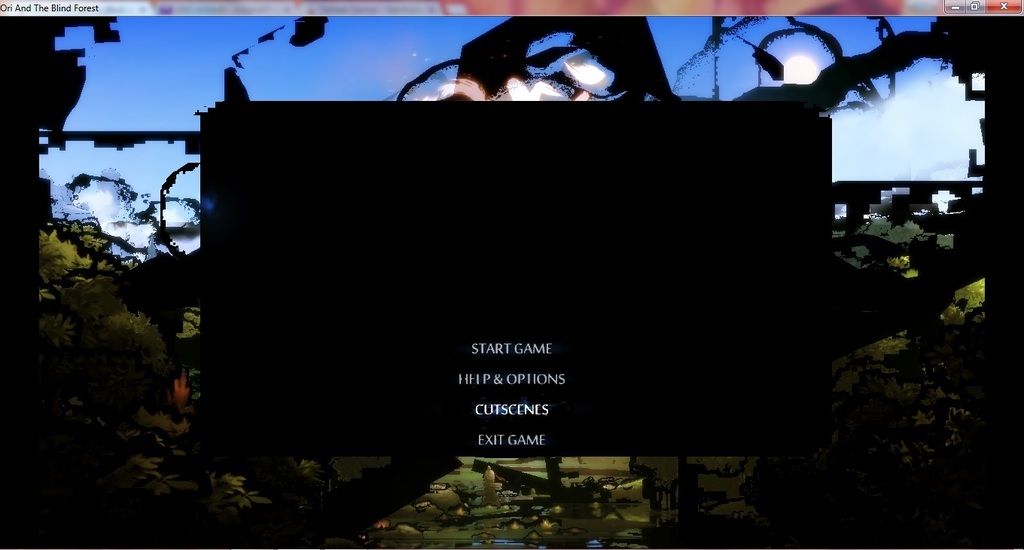
I am having this same exact issue. I just bought the game from Steam and I've tried a whole bunch of graphics changes. Nothing helps. My graphics card is the AMD R9 200 series and my drivers are currently updated using 14.501 and 14.12 Catalyst Omega Software.
Here is my support tool info:
https://www.sendspace.com/file/6kx7v7
Is there really no fix for this yet??
I have 4 other telltale games and none of them have this problem. You guys have got to be able to patch this.
R9 280X Toxic with 14.12 Omega drivers. Works like a charm. Looks like 285 card got lots of problems...
edit: Game from steam.
Unfortunately we are still looking into the root cause of the issue, and I do not have any updates on a resolution for this particular issue. If you would like to play sooner than later, my previous suggestion of installing a previous driver version should temporarily resolve this particular issue if you are using an AMD R9 series GPU.
I think I found a trick to solve the problem...
Download this zip: https://www.sendspace.com/file/bdut48
Put the dll's in the folder of the exe (example for Steam C:\Program Files (x86)\Steam\steamapps\common\Game of Thrones), these dll's are taken directly from AMD official drivers and force the game to run with an old driver (in this case version 14.9).
To me the problem has solved, let me know.
This in fact does the trick. Thank you for finding this, no issues yet.
Thanks kimo!
I'm using the gog version of the game, but the solution worked nonetheless.
Thank you I just purchased this on steam during the 50% off sale and I have R9 285 and was in horror when I seen this has been an issue for 8-9months or so. Glad to have found a fix, thanks very much for your efforts... kind of wish I could give you some money that I gave to telltale, as you've done a better job at solving this than they have!
You sir, are freaking awesome. It fixes the issue completely.I was about to refund this game and you saved my skin. Thank you so much
So this worked for me when i was using windows 8.1, then i upgraded into windows 10. Now if I use the dll's, it just boots to a white screen. Do u have any ideas? thx
The above fix does in fact work, but the fact that TellTale has known about this issue for 8 months and still doesn't even seem to know what's causing it shows just how little effort they put into fixing their games.
Also to me, I'm trying to get back working but I can't
Same.. that guys fixed worked for me on windows 8.1, but white screen on windows 10. Game will boot if i remove the dlls but surprise surprise the original issue comes back.
Telltale not even responding anymore. Might just do a steam refund explaining this, beyond a joke.
Don't suppose have a fix for the white screen issue on windows 10? You seem more capable at fixing these issues than telltale.
Cheers.
I used the same method that I've used to fix frame rate in The Witcher 3, by moving old dll's driver in exe folder. Now I have no idea, Telltale have to fix that problem definitively... problem start with AMD Omega drivers (14.12) released 09/12/14.
I used the following thread to fix under Windows 8.1:
http://forums.guru3d.com/showthread.php?t=399547